一、准备

\1. 原地址

img

\2. 检查html发现,网页是有规则的分页, 最大图片的class为pic-large

二、代码

 1 import requests
2 import os
3 from bs4 import BeautifulSoup
4
5 url = 'http://www.win4000.com/wallpaper_detail_157712.html'
6 imgmkdir = 'D://Download//ghost_1//'
7
8
9 # 获取网页url
10 def getUrlList():
11 imgUrlList = []
12 for i in range(0, 10):
13 imgUrl = ''
14 url_split = url.split('.html')
15 if not i == 0:
16 imgUrl += url_split[0] + '_' + str(i) + '.html'
17 # print(imgUrl)
18 imgUrlList.append(imgUrl)
19
20 return imgUrlList
21
22
23 # 下载图片
24 def downImg(imgUrl):
25 try:
26 if not os.path.exists(imgmkdir):
27 os.mkdir(imgmkdir)
28 if not os.path.exists(imgUrl):
29 r = requests.get(imgUrl)
30 r.raise_for_status()
31 # 使用with语句可以不用自己手动关闭已经打开的文件流
32 imgpath = imgmkdir + imgUrl.split('/')[-1]
33 # 开始写文件, wb表示写二进制文件
34 with open(imgpath, 'wb') as f:
35 f.write(r.content)
36 print(imgUrl + '【爬取完成】')
37 else:
38 print(imgUrl.split('/')[-1] + '【文件已存在】')
39 except Exception as e:
40 print("爬取失败" + str(e))
41
42
43 # 获取imgHtml标签
44 def getcontent(soup):
45 for i in soup.find_all('img', class_='pic-large'):
46 imgsrc = i['src']
47 if imgsrc.find('http') >= 0 or imgsrc.find('https') >= 0:
48 # 下载图片
49 downImg(imgsrc)
50
51
52 # 根据url获取html源码
53 def getHtmlByUrl(htmlUrl):
54 htmlText = requests.get(htmlUrl).content
55 # 使用beautifulSoup解析html
56 soup = BeautifulSoup(htmlText, 'lxml')
57
58 return soup
59
60
61 def main():
62 htmlUrlList = getUrlList()
63 for url in htmlUrlList:
64 htmltext = getHtmlByUrl(url)
65 getcontent(htmltext)
66
67
68 if __name__ == '__main__':
69 main()

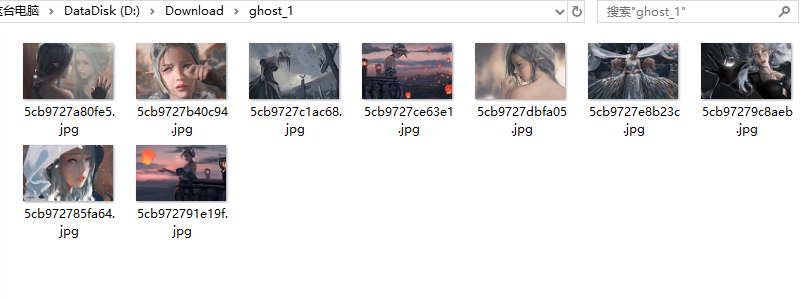
三、结果

img

四、总结

  代码用比较笨的方法来获取,先试水

五、本人(副社长)升级的代码:

# -*-coding:utf-8-*-

import requests
import os
from bs4 import BeautifulSoup

url = 'http://www.win4000.com/wallpaper_detail_157712.html'
a=0
imgmkdir = 'D://迅雷下载//'


# 获取网页url
def getUrlList():
imgUrlList = []
for i in range(0, 10):
imgUrl = ''
url_split = url.split('.html')
if not i == 0:
imgUrl += url_split[0] + '_' + str(i) + '.html'
# print(imgUrl)
imgUrlList.append(imgUrl)

return imgUrlList


# 下载图片
def downImg(imgUrl):
try:
if not os.path.exists(imgmkdir):
os.mkdir(imgmkdir)
if not os.path.exists(imgUrl):
r = requests.get(imgUrl)
r.raise_for_status()
# 使用with语句可以不用自己手动关闭已经打开的文件流
imgpath = imgmkdir + imgUrl.split('/')[-1]
# 开始写文件, wb表示写二进制文件
with open(imgpath, 'wb') as f:
f.write(r.content)
print(imgUrl + '【爬取完成】')
else:
print(imgUrl.split('/')[-1] + '【文件已存在】')
except Exception as e:
print("爬取失败" + str(e))


# 获取imgHtml标签
def getcontent(soup):
for i in soup.find_all('img', class_='pic-large'):
imgsrc = i['src']
if imgsrc.find('http') >= 0 or imgsrc.find('https') >= 0:
# 下载图片
downImg(imgsrc)


# 根据url获取html源码
def getHtmlByUrl(htmlUrl):
htmlText = requests.get(htmlUrl).content
# 使用beautifulSoup解析html
soup = BeautifulSoup(htmlText, 'lxml')

return soup


def main():
htmlUrlList = getUrlList()
for url in htmlUrlList:
htmltext = getHtmlByUrl(url)
getcontent(htmltext)


if __name__ == '__main__':
while 1:
main()
if a==0:
a=0
if a==1:
url = 'http://www.win4000.com/wallpaper_detail_169808.html'
if a==2:
url = 'http://www.win4000.com/wallpaper_detail_169594.html'
if a==3:
url = 'http://www.win4000.com/wallpaper_detail_169553.html'
if a==4:
url = 'http://www.win4000.com/wallpaper_detail_169629.html'
if a==5:
url = 'http://www.win4000.com/wallpaper_detail_169317.html'
if a==6:
url = 'http://www.win4000.com/wallpaper_detail_169116.html'
if a==7:
url = 'http://www.win4000.com/wallpaper_detail_169163.html'
if a==8:
url = 'http://www.win4000.com/wallpaper_detail_168984.html'
if a==9:
url = 'http://www.win4000.com/wallpaper_detail_168684.html'
if a==10:
url = 'http://www.win4000.com/wallpaper_detail_168524.html'
a=a+1